How to Humanize AI Text: 7 Fixes With Before and After Examples
Make AI text sound human with 7 fixes, each with a before and after. Plus which AI models need the least editing, a free humanizer, and a cheat sheet.

· Updated · 10 min read

To humanize AI text, remove the habits that give it away: em dashes, a small set of overused words like "leverage" and "delve", filler transitions, lists that always come in threes, and vague claims where a fact should be. Then add what a model can't know, like a real number, an example from your own work, or an opinion. The first part takes minutes. The second part is what makes the text sound like you.
Below are seven fixes with a before and after for each, which models need the least of this work, and a workflow for editing a draft in about 10 minutes.
The fast way: run it through a humanizer
Paste the text into our free AI text humanizer. It highlights AI patterns as you type, so you can see the problems before you change anything. Then it rewrites the text in the tone you pick: natural, casual, professional, academic or simple.
What it looks for:
- Em dashes and double hyphens
- About 40 overused words and their variants, like "leverage", "seamless", "robust" and "delve"
- Filler phrases such as "it's worth noting" and "in today's fast-paced world"
- Stock transitions at the start of sentences ("Moreover", "Furthermore")
- "It's not just X, it's Y" and "not only X but also Y"
The rewrite keeps your facts, names, numbers and structure. It's free with no signup and takes up to 5,000 characters per run. Open the Changes view afterwards to see every word it changed.
A humanizer handles the mechanical patterns. It can't add your experience or your opinions, so the rest of this guide covers the edits only you can make.
Seven fixes that make AI text sound human
1. Replace the em dashes
The em dash is the best-known sign of AI writing. Models use it for asides, for emphasis and to join clauses, often several times per paragraph.
Don't swap each dash for a semicolon or a spaced hyphen. That keeps the same rhythm, and readers still notice. Split the sentence, use a comma, or put a true aside in parentheses.
Before: "The model performs well — especially on coding tasks — which makes it ideal for developers."
After: "The model performs well on coding tasks, which makes it a good fit for developers."
2. Swap the words AI overuses
A short list of words shows up far more often in AI text than in everyday writing. None of them are wrong. They become a tell when they replace a concrete fact.
| AI word | Write instead |
|---|---|
| leverage, utilize | use |
| comprehensive | complete, or list what's covered |
| seamless | say what's smooth: "one click", "no second login" |
| delve | look at, or just start |
| crucial | important, or say why |
| robust | say what makes it strong |
| tapestry | delete it |
| landscape | market, field |
| elevate | improve, or say how |
| navigate | handle, work through |
A find-and-replace pass through these words helps. Replacing them with the specific thing they were hiding helps more. "A robust tool" becomes "it handles 10,000 rows without slowing down".
3. Break the rule of three
AI groups things in threes by reflex: "clarity, precision, and efficiency." People use as many items as there really are. Sometimes that's two. Sometimes it's one point made well.
Before: "This approach offers clarity, efficiency, and scalability."
After: "This approach is clearer, and it keeps working as traffic grows."
4. Cut the filler transitions
Transitions like these add length without adding meaning:
- "Moreover" and "Furthermore": start the next sentence
- "Additionally": use "also", or start a new sentence
- "It's worth noting that": say the thing
- "In today's rapidly evolving landscape": delete the whole phrase
- "In conclusion": end on your last real point instead
If a sentence follows from the one before it, it doesn't need a signpost.
5. Add specifics and a point of view
AI hedges because it doesn't know your situation. "This could potentially be useful in certain scenarios." A person who's done the work says "I use this every week for client reports."
- Replace "many users" with the actual number
- Replace "could be useful" with what you used it for
- Add one example from your own work
- Name the tool, the version or the company
- Say which option you'd pick, and why
No tool can make this fix for you, because the specifics have to come from you. Don't let a model invent them either. A made-up statistic is worse than a vague sentence.
6. Vary the sentence length
AI prose runs at one speed: sentence after sentence of similar length, paragraphs of three or four sentences. Human writing speeds up and slows down.
- Put a short sentence after a long one when a point needs room
- Let a paragraph be one line if it deserves it
- Start with "But" or "And" now and then
Go easy on this. Three fragments in a row, or "And" at the start of every paragraph, is its own robotic voice. Read the text aloud. If every sentence has the same beat, change a few.
7. Say things directly
Some AI habits are sentence shapes rather than words:
- "It's not X, it's Y" knocks down a claim nobody made. "It's not just a tool, it's a complete solution" becomes "It tracks every invoice and flags the late ones."
- A question followed by a punchline. "The result? Chaos." becomes "Orders shipped twice for a week."
- A colon reveal. "The best part: it learns." becomes "It learns from every correction."
- A recap ending that repeats the article. End on your last concrete point or the next step instead.
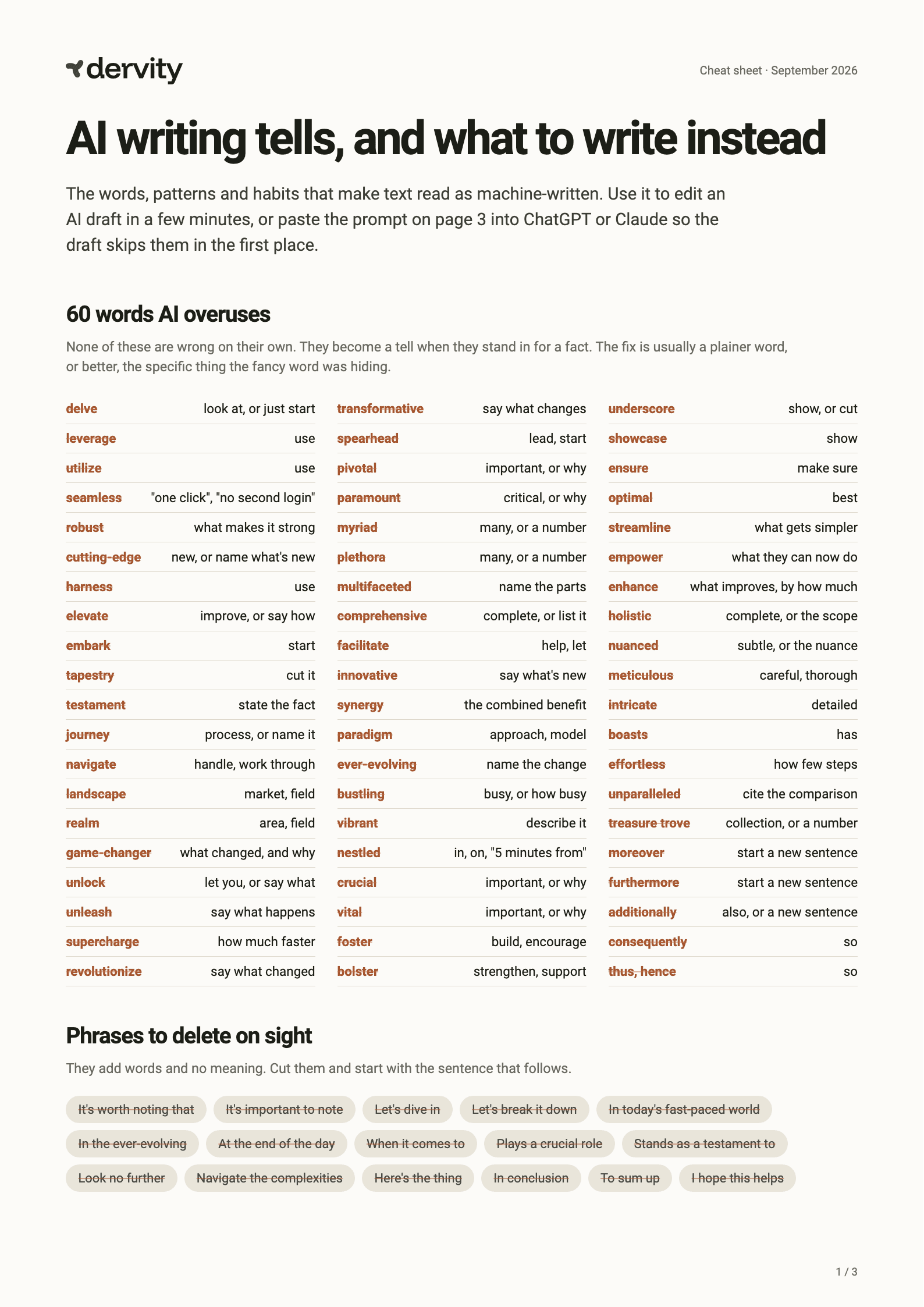
Keep the fixes next to you while you edit
The free cheat sheet lists 60 words AI overuses with what to write instead, 12 patterns that give AI away, and a prompt that makes ChatGPT or Claude skip them.
- 60 words and their plain replacements
- 12 patterns with before and after
- A copy-paste no-AI-voice prompt
- A 10-point pre-publish check
Some AI models need much less humanizing
The model you draft with decides how much cleanup you'll do. EQ-Bench's Creative Writing benchmark gives every model a "slop" score for how often its writing leans on words and phrases that are overused in AI text. Lower means fewer stock phrases to fix.
- Claude Opus 56.6
- Claude Fable 5.18.2
- GPT-6 Astra8.4
- GLM-5.38.4
- GPT-6 Sol9.0
- Kimi K39.7
- Claude Sonnet 511.6
- DeepSeek V4.1 Flash22.4
- Gemini 3.8 Flash22.6
- Gemini 3.1 Pro30.0
Source: EQ-Bench Creative Writing v3, September 2026. Scores come from short stories, so treat them as a guide for other kinds of writing.
The spread is wide. The Gemini and DeepSeek models here score about three times higher than the best Claude and GPT models, so their drafts carry far more stock phrasing to remove. If you write with AI every day, switching to a low-slop model saves more editing time than any humanizer.
We use the same data for our own tools: the humanizer runs on a model from the low end of this chart. For the full ranking, with quality and cost per piece, see the best AI models for creative writing.
What about AI detectors?
AI detectors guess from statistical patterns, like how predictable the word choices are and how uniform the sentence lengths are. The fixes above change exactly those things, so edited text usually looks less machine-written to a detector too.
No detector is reliable enough to treat as proof either way, and no humanizer can promise a pass. Aim for text a reader trusts, not a score. If your school or employer has rules about AI use, follow them. Humanizing is for making your own drafts read better, not for passing off work you didn't do.
When to humanize, and when to skip it
Worth the edit:
- Blog posts and articles, where readers decide in a sentence or two whether to trust you
- Emails and outreach, where a generic tone gets ignored
- Marketing and product pages, where your voice is part of the brand
- Social posts, where stock phrasing stands out fast
Usually not worth it:
- Internal notes and documentation
- Code comments and data reports
- Outlines you'll rewrite anyway
A 10-minute workflow for AI drafts
- Start with a better draft. Paste the no-AI-voice prompt from the cheat sheet into your chat, and use a low-slop model if you can.
- Run the humanizer to clear em dashes, buzzwords and filler.
- Add what only you know: a number, an example, an opinion. This is where most of the quality comes from.
- Read it aloud and fix any sentence you stumble over.
- Check the ending. Cut a recap paragraph if there is one.
Steps 1 and 2 take a minute or two. Plan on a few minutes of your own editing per 500 words for step 3. Start with the draft you're working on today: paste it into the humanizer and see which patterns light up.
FAQ
How do I make AI text sound more human?
Remove the patterns that give AI away: em dashes, overused words like "leverage" and "delve", filler transitions, lists of three and "it's not X, it's Y" sentences. Then add specifics only you know, like real numbers, examples from your work and a clear opinion. A humanizer handles the first part in seconds.
Is there a free AI humanizer?
Yes. Dervity's AI text humanizer is free with no signup. It highlights AI patterns as you type and rewrites up to 5,000 characters per run in one of five tones, keeping your facts and structure.
Which AI model writes the most human-sounding text?
On EQ-Bench's Creative Writing slop score, which measures stock AI phrasing, Claude Opus 5 scores lowest at 6.6. Claude Fable 5.1, GPT-6 Astra, GLM-5.3 and GPT-6 Sol all sit between 8 and 9. Gemini 3.8 Flash and DeepSeek V4.1 Flash score about 22.
Can AI detectors tell if text was humanized?
Sometimes. Detectors look for predictable wording and uniform sentences, and editing changes both. But no detector is accurate enough to be proof, and no tool can guarantee a pass. Write for the reader, and follow your school's or employer's rules on AI use.


